

If an email account on your server gets compromised, the damage can happen fast: IP reputation tanks, mail queues explode, and delivery grinds to a halt. That’s why we built Outbound Spam Protection – a fully automatic shield that detects and blocks spammy bursts the moment they start, then notifies you instantly before reputation suffers.
What’s new
- Automatic, permanent blocking: When cPFence detects abusive outbound activity, it instantly stops the offending account — no manual cleanup, no missed alerts.
- Instant notifications: Get notified by email and Slack right away, so you can review and respond on the spot.
- One-click unblocking: If the issue’s resolved , unblock instantly with a single command.
Why it matters
- Protects IP reputation: Stops spam before it can damage deliverability.
- Saves hours of cleanup: No more chasing logs after the fact.
- Brings clarity: Every incident includes detailed notifications showing which account was blocked and why.
- Peace of mind: Built for hosts and VPS owners who need reliable, automatic guardrails.
How it works
- Detection: cPFence continuously monitors outbound patterns for signs of compromise or abuse.
- Enforcement: The affected email user is immediately blocked from sending.
- Notification: Admins receive an instant email and Slack message with context.
- Remediation: Clean or reset the account, then lift the block with a simple command.
Works from CLI and WebUI
WebUI:
Go to Tools & Utilities → Spam AutoShield Tools → Block / Unblock Outgoing Email
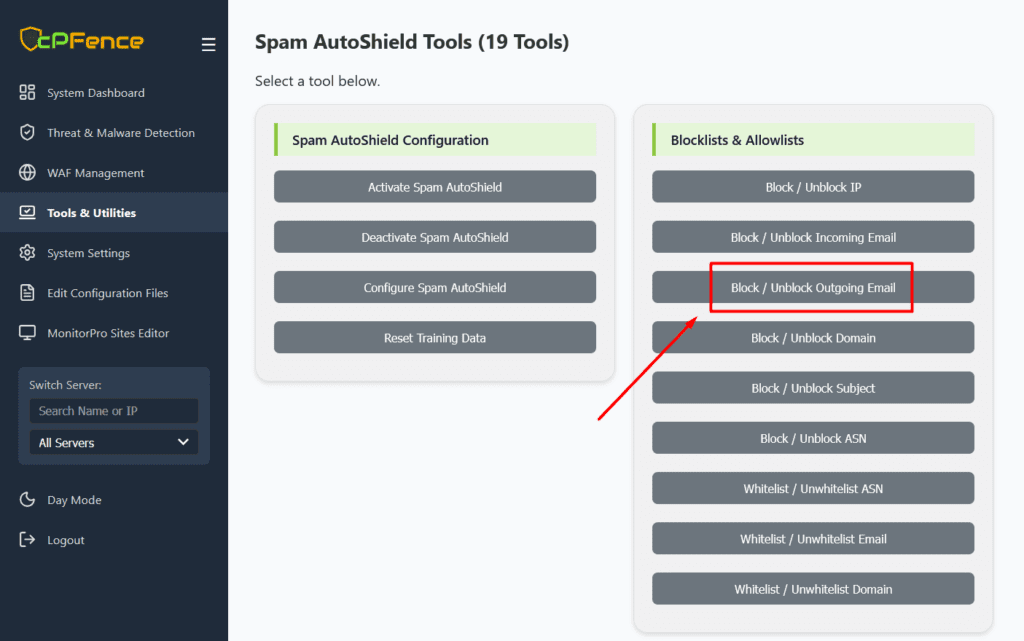
Tip: Adjust the limits (MAX_SMTP_MSGS_PER_HOUR and MAX_WEB_MSGS_PER_HOUR) in settings page as needed. (Default: 200)
CLI commands:
Block a specific sender:
cpfence --add-spam-autoshield-out-email [email protected]
Unblock after remediation:
cpfence --del-spam-autoshield-out-email [email protected]
Compared to Enhance’s default behavior
- Enhance limiter: Temporary throttling, no permanent auto-block, no notifications.
- cPFence protection: Permanent block, real-time alerts, and fast recovery when you’re ready.
Perfect for
- Hosting companies safeguarding shared mail servers
- VPS owners who want set-and-forget protection
- Anyone serious about email reputation and fast response
Get started
Already using cPFence? You’re all set – Outbound Spam Protection is enabled by default when the Spam AutoShield module is active. If needed, you can turn this new feature off by setting SPAM_AUTOSHIELD_LIMITS to off in config file or WebUI settings page.
Want more control? Use the CLI or WebUI to manage blocks manually anytime.
Still on the fence?
Try the cPFence free trial today and experience how easy it is to transform Email security and management on your servers.
Stay protected. Stay deliverable. Let cPFence stop outbound spam before it stops you.






No comment