Introducing cPFence Version 3.0.5 – Now with MySQL User Blacklisting

We’re excited to announce the release of cPFence version 3.0.5, which brings significant enhancements to our already powerful cPFence Owl module. This latest update introduces a new feature that allows you to blacklist specific MySQL users, helping to prevent resource-heavy queries from slowing down your server, especially in shared hosting environments.
Current update: This post records the original v3.0.5 announcement. MySQL user blacklisting remains available in cPFence v4+; the current controls below replace the old configuration flow.
Why This New Feature?
Efficient resource management is crucial for maintaining the performance and stability of your Enhance servers. While Enhance server tools, typically offer control over CPU, RAM, I/O, and other resources, they lack the ability to effectively manage MySQL usage, which can lead to significant issues. Similar to MySQL Governor in CloudLinux but much simpler, cPFence now addresses this gap. Without proper MySQL management, users with poorly optimized scripts can abuse server resources, leading to high load issues or even complete server crashes.
With the newly added MySQL user blacklisting feature in cPFence, you can now complete the puzzle of comprehensive server resource management. This feature empowers you to prevent resource-hogging queries from disrupting your server’s performance, ensuring a smoother and more reliable environment for all users. By integrating this capability into cPFence, we’re helping you maintain optimal server efficiency and protect against the risks posed by inefficient MySQL queries.
How does it work?
For those already familiar with cPFence, you know that the Owl module has been a cornerstone of our security suite. It’s designed to monitor your server continuously, taking automated actions to block malware and dynamically adjusting scanning speed based on your server’s resources. With version 3.0.5, we’ve added another layer of protection by enabling the blacklisting of MySQL users who are known to run poorly coded scripts or excessively slow queries.
This new feature allows you to configure the module to automatically terminate long-running MySQL queries from blacklisted users, ensuring that your server remains responsive and efficient. Whether you want to target a specific database user or blacklist an account username associated with multiple databases, cPFence Owl has you covered.
Key Features of the New Update:
- User Blacklisting: Easily blacklist MySQL users who are responsible for resource-heavy queries. For cPFence v4+, add their usernames to Blacklisted database users in System Settings → General Settings → Monitoring, or the
BLACKLISTED_USERSvariable in/etc/cpfcli/config.confto prevent their queries from monopolizing server resources. - Custom Query Limits: Set the maximum execution time for queries using the MAX_EXECUTION_DURATION parameter. Managed queries exceeding this limit are eligible for termination. The default is 30 seconds; choose a limit that suits your workload.
- Enhanced Malware Detection: cPFence now detects Java and ELF malware, expanding its security coverage beyond the previously supported PHP, Python, Perl, HTML, and Bash.
- Improved Update System: If you have the default installation of cPFence, you’ll receive this latest update automatically. With this update, infected files will now be preserved in quarantine after upgrading to a new version, ensuring that files in the quarantine folder are not lost during updates.
For manual blacklisting, keep Owl monitoring on and turn Owl AutoMySQL off. Enter MySQL users or hosting-account usernames separated by |, set Maximum query duration, then save for the intended server. Turning automatic mode off does not clear the manual list. Query termination can interrupt application work, so start with a reviewed user and keep the previous settings for recovery.
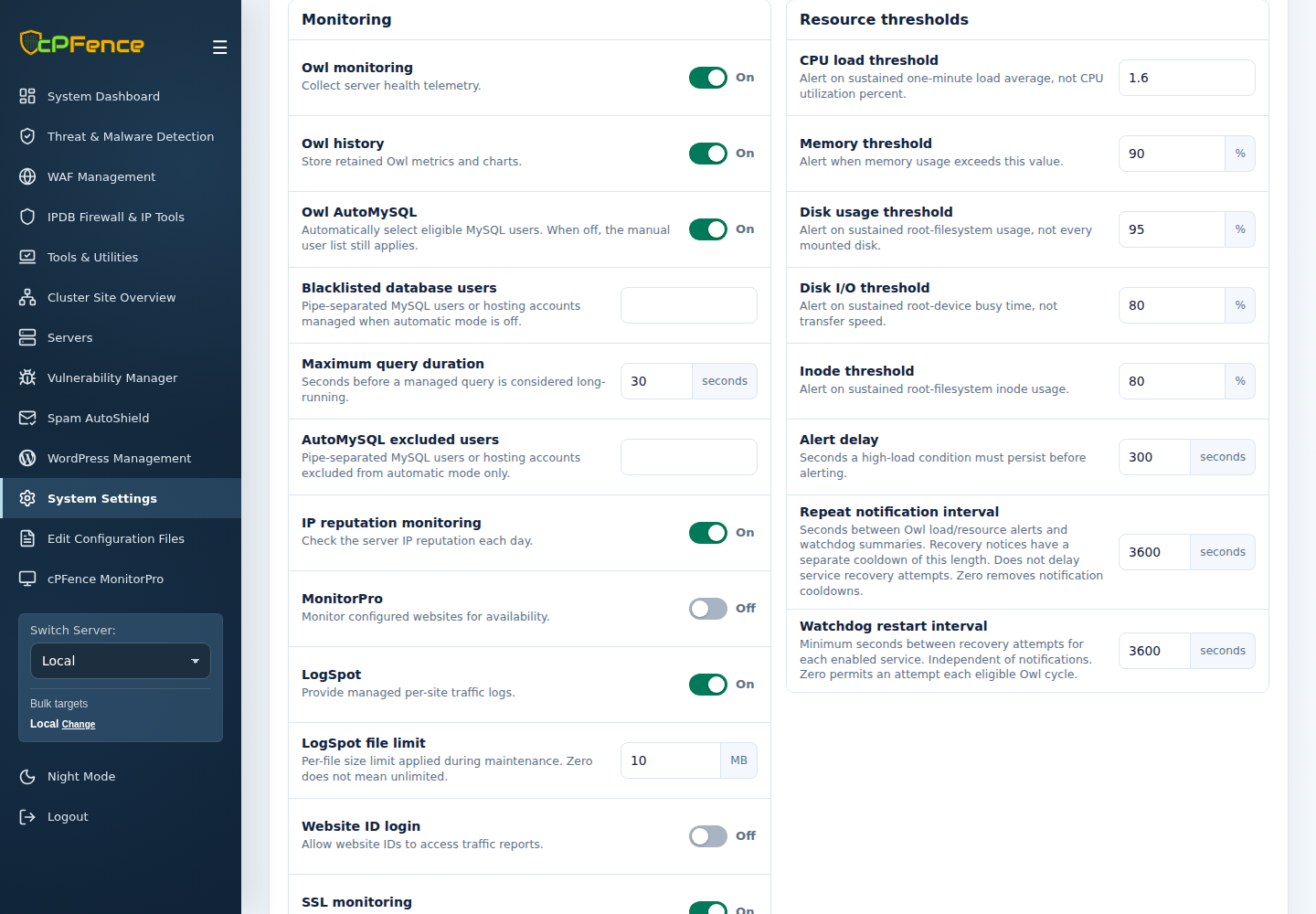
Prefer automatic selection? Use cpfence --owl-automysql-on; cpfence --owl-automysql-off returns to manual mode. Root administrators can inspect killed-query records with cpfence --monitor-killed-queries. See the current Owl AutoMySQL guide for exclusions, scopes and how to stop both modes.
Other Notable Improvements:
- Bug Fixes: We’ve resolved an issue where incorrect values were being displayed in email notifications from the Owl module. Additionally, we’ve fixed a problem where Smart and Full scans wouldn’t start on certain systems.
How to Get the Update:
If you have the default installation of cPFence, you should have already received this update automatically. That was the update path for the original release. For current cPFence v4+, follow the installation and upgrade guide. To check your installed version, run cpfence --version on your server.
The cPFence Owl module continues to be a vital tool for maintaining the performance and security of your servers. With these new enhancements, we’re confident that you’ll find it even more effective in managing your server’s resources and protecting against potential threats.
Keep resource-heavy queries in check
Explore Owl monitoring and query controls with cPFence v4+ for Enhance.
Start free trial