Owl AutoMySQL®:One-Click MySQL Resource Limits from cPFence
Managing MySQL resource usage on shared hosting servers can be challenging, especially when hosting hundreds of websites. While tools like MySQL Governor in CloudLinux provide solutions, many hosting providers using Ubuntu and the Enhance control panel lack similar functionality. This often leads to high server loads due to unregulated MySQL usage.
Recognizing this gap, we’ve introduced a game-changing feature: Owl AutoMySQL.
Why Owl AutoMySQL?
Previously, cPFence users had the option to manually blacklist abusive MySQL users, a tedious task requiring constant server monitoring. This process was especially cumbersome on shared hosting servers with numerous websites, making it nearly impossible to keep up with resource abuse.
Owl AutoMySQL automates this process, offering a smart and effortless way to manage MySQL resource limits without compromising server performance or user experience.
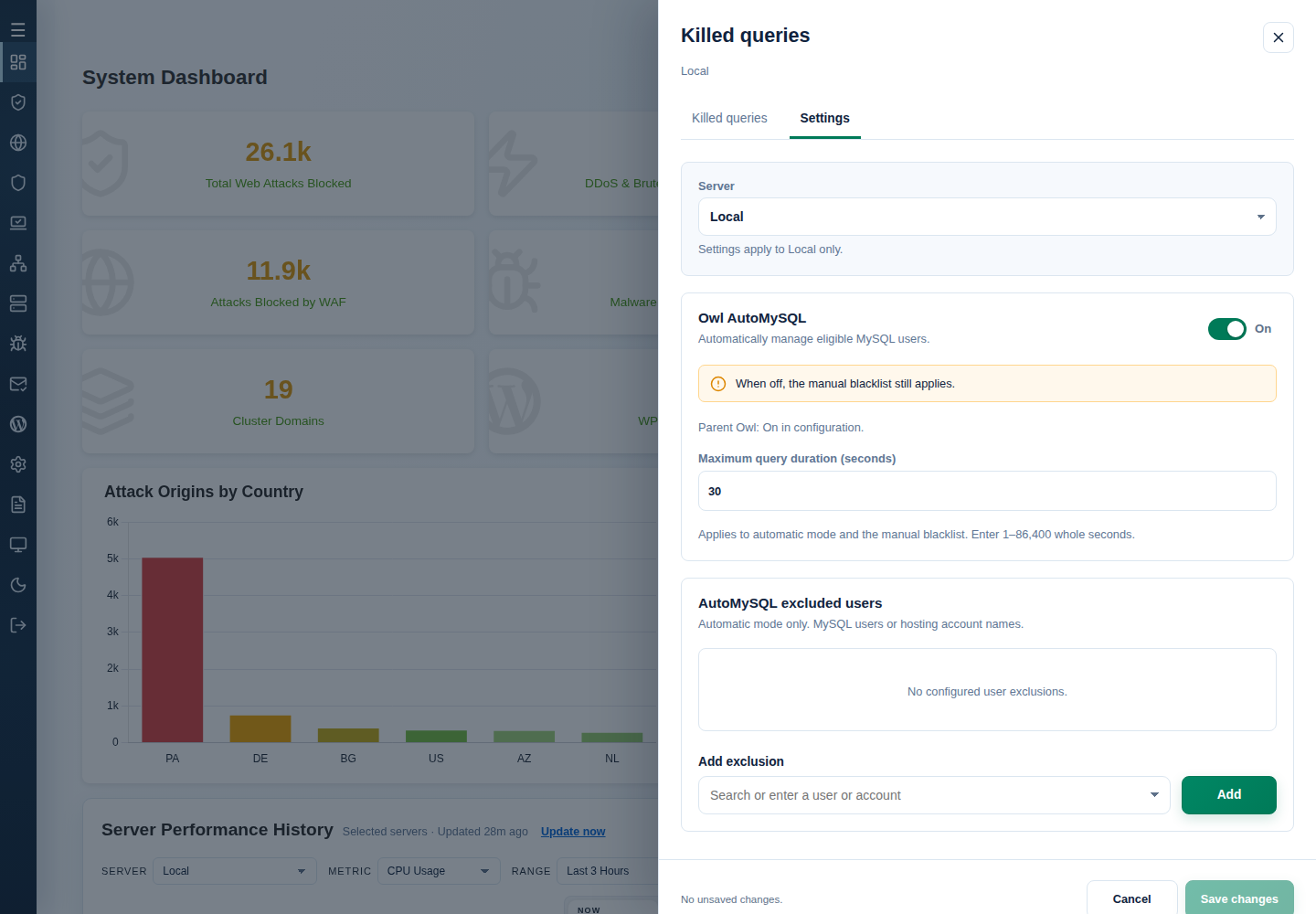
In cPFence v4+, you can manage it straight from the WebUI—no passwordless SSH setup needed. On System Dashboard, choose the intended server and open Slow Queries Killed → Settings. Review the server shown under Settings apply to, keep Owl monitoring enabled, enable Owl AutoMySQL, then save your intended changes.
Key Features of Owl AutoMySQL
- One-Click Activation Getting started is incredibly simple. Just run:
cpfence --owl-automysql-on
From that moment, Owl AutoMySQL begins 24/7 smart monitoring and management of MySQL resource usage. - Automatic Abuse Prevention The system selects eligible MySQL users and terminates their queries or sleeping connections when they exceed Maximum query duration, helping prevent server load spikes. The default is 30 seconds; keep that recommended value in both automatic and manual modes.
- Customizable Exclusions Got a personal website or a priority client you don’t want to manage with Owl AutoMySQL? No problem. Add them to the exclusion list in your configuration file:
/etc/cpfcli/config.conf
Example:
# List of MySQL users to exclude from Owl AutoMySQL management.

# Use | as a separator (e.g., "user1|user2"). Default is empty, meaning no users are excluded.

EXCLUDED_USERS_AUTO_MySQL="user1|user2"
Prefer clicks to editing a file? Use Add exclusion in the same Settings drawer. Enter the actual MySQL user, or a verified hosting account name to cover its associated database users, then Add and Save changes. A domain name is not a MySQL username. Exclusions apply to automatic mode only.
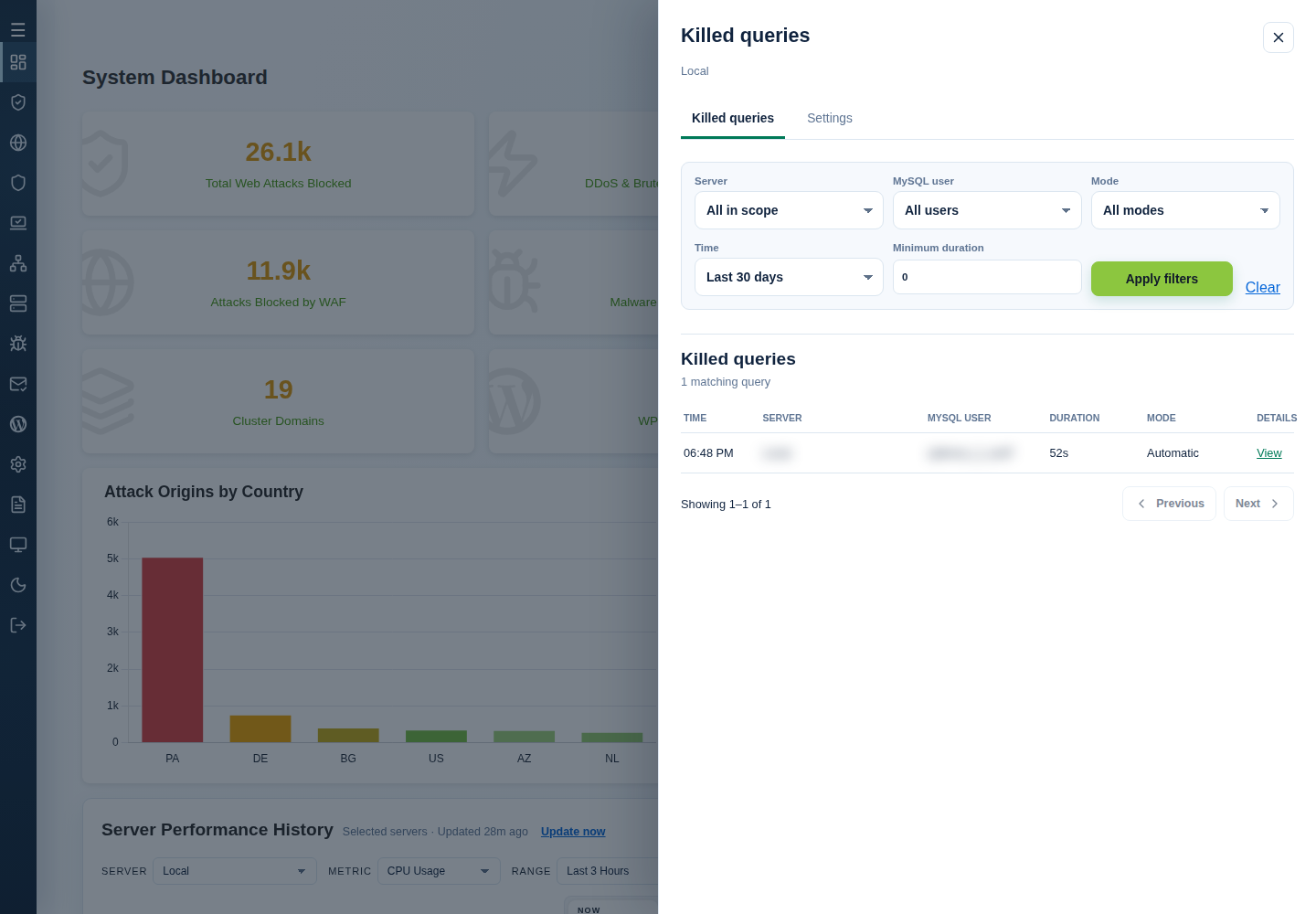
Want to see what the Owl caught? Open the Killed queries tab, filter by server, user, mode, time or duration, then Apply filters. Select View for recorded query details.
From root on the intended server, cpfence --monitor-killed-queries follows the killed-query log; Ctrl+C stops viewing it. cpfence --owl-automysql-off disables automatic selection, but a configured Blacklisted database users list still applies in manual mode. See AutoMySQL settings and exclusions for the complete controls.
How Owl AutoMySQL Stands Out
- Designed for Enhance Servers
Owl AutoMySQL was specifically developed for hosting providers using Enhance and Ubuntu. These environments lack native support for CloudLinux or MySQL Governor, making Owl AutoMySQL the perfect alternative. - Full Automation
No need to constantly monitor your server or manually blacklist users. Owl AutoMySQL ensures efficient resource management around the clock. - Non-Intrusive
Our smart algorithm distinguishes between legitimate and abusive queries, ensuring no interference with your customers’ normal operations.
Revolutionizing MySQL Resource Management
With Owl AutoMySQL, cPFence transforms how Enhance server users manage MySQL resources. This feature bridges a critical gap, providing a seamless, automated solution that keeps your servers running smoothly—even under heavy traffic.
Ready to Get Started?
Activate Owl AutoMySQL today by running:
cpfence --owl-automysql-on
Let the Owl handle MySQL abuse and ensure your Enhance server operates at peak efficiency, all while saving you time and effort. Say goodbye to manual MySQL management and hello to smarter resource control with cPFence.
Put the Owl to work on your servers
Try cPFence and bring MySQL query control, monitoring and server protection together.
Start free trial