
Review suspicious activity
In cPFence v4+, Threat & Malware Detection → Suspicious Activity lists the scheduled checks for hidden backdoors and what cPFence did about each one. Support users need access to the selected server and permission to view findings.
| Type | What cPFence looks for | What cPFence does automatically |
|---|---|---|
| Backdoor plugins | A PHP file in a site’s plugins folder that matches a known backdoor family. | Locks the file (owner root:root, permissions 000) so the web server cannot run it. The file is not deleted. |
| Startup files | A command in an account’s .bashrc, .profile or .bash_profile that runs whenever the account opens a shell. |
Removes the malicious lines and keeps a private backup of the original file on the server. |
| wp-config.php | Code added to a site’s wp-config.php, which runs on every page load. |
Removes the injected lines and keeps a private backup of the original file on the server. |
| Cron jobs | A cron job that matches patterns used to download or restart malware. | Nothing: cPFence never changes cron jobs, so the job stays scheduled until you remove it. The alert email includes the full command. |
Find a finding
Section titled “Find a finding”- Open Suspicious Activity and choose Local or one secondary server in Server scope.
- Choose Summary period: Last month, Last week, Last 24 hours or All time.
- Search by site, owner or file path. Choose Type, Status and Started since, then Apply filters. Clear all resets the filters.
- Review Recent suspicious activity, then open a finding’s details.
The Detected, Fixed automatically, Needs review and Incomplete cards cover the selected period and type. Select a card to filter the table; select it again to clear that filter. Searching the table does not change the card totals.
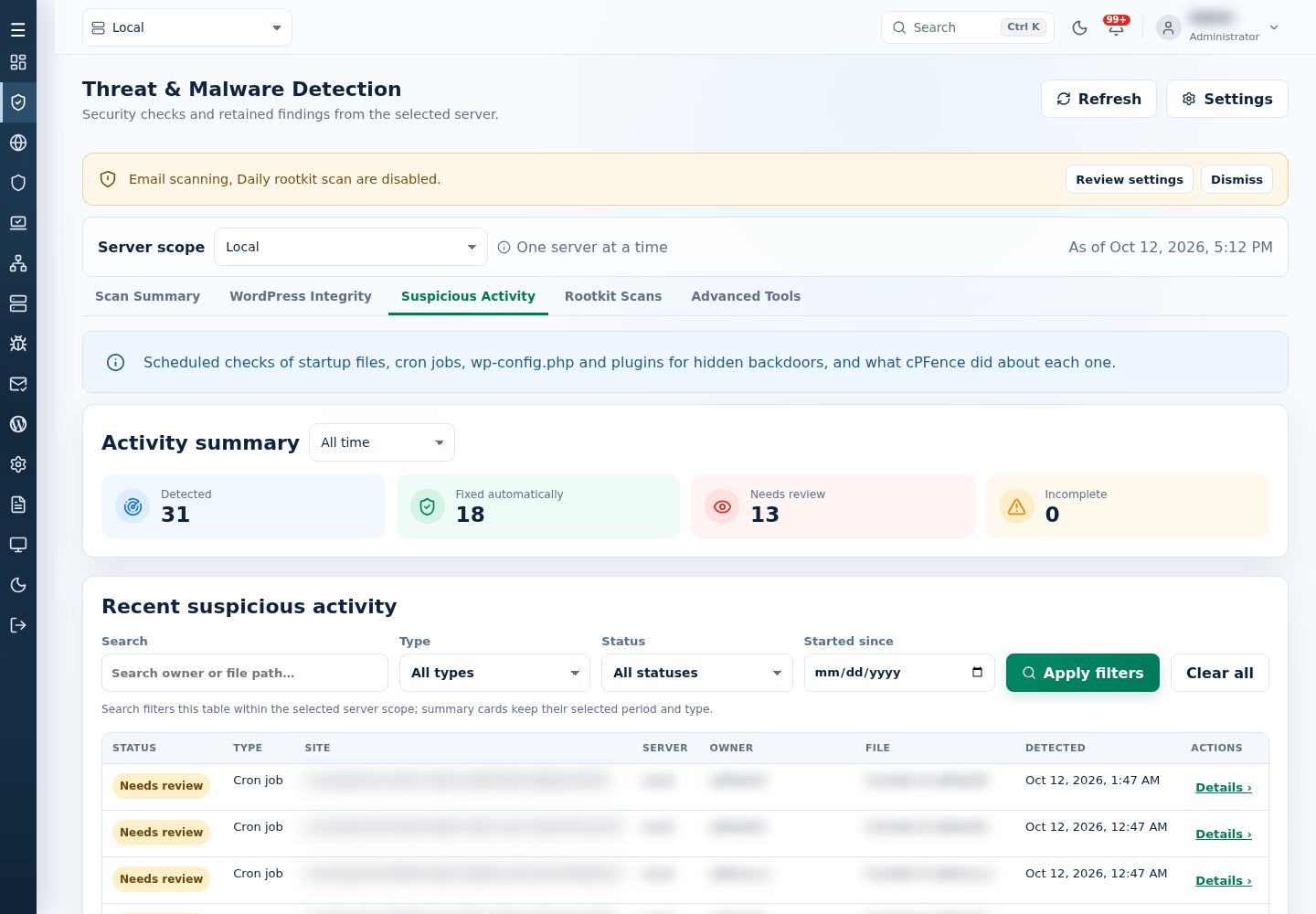
An alert for one check opens this tab showing only that check’s findings. Select Show all activity to return to the full list.
| Status | Meaning |
|---|---|
| Fixed automatically | cPFence locked the file or removed the malicious lines. |
| Needs review | cPFence recorded the finding but did not change anything. Cron jobs always need review. |
| Incomplete | The action did not finish. Read the reason in the details. |
Read the details and act
Section titled “Read the details and act”Suspicious activity details explains each finding in three parts:
- What this is: what the finding means and why attackers use it.
- What cPFence did: the automatic action, or why no action was taken.
- What to do: the steps to finish the cleanup, such as deleting the plugin folder, changing passwords or reviewing the account’s cron jobs in the control panel.
Use the buttons under the guidance:
- Scan this site opens a new malware scan for the affected site, ready for you to confirm.
- Preview shows the flagged file (plugin file, startup file or
wp-config.php) so you can check it before you change anything. - Mark reviewed hides this check’s alert from the alerts menu. The record stays in Suspicious Activity.
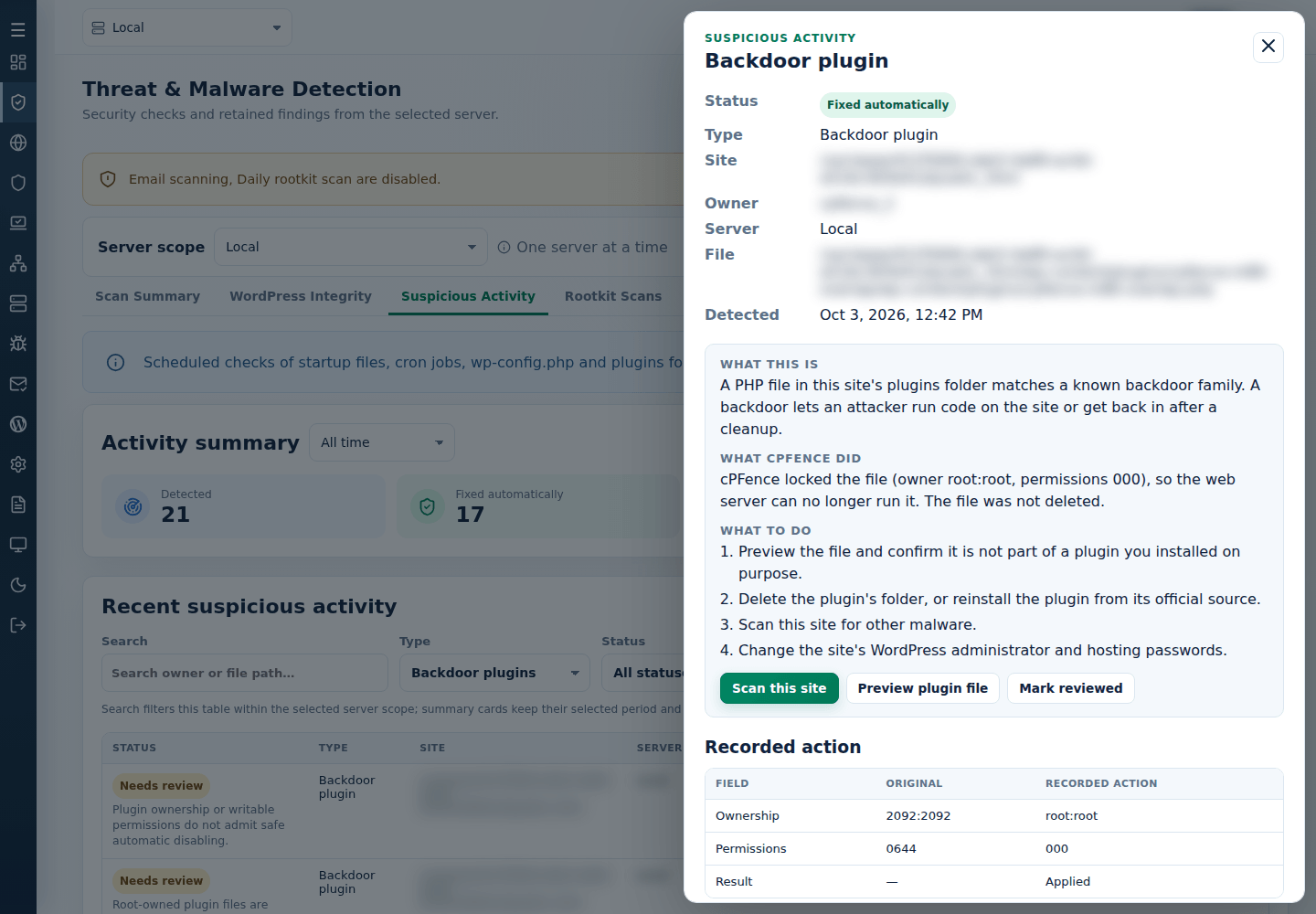
Below the guidance, the recorded findings and actions show what cPFence changed, such as the original and new ownership and permissions of a locked plugin file.
Investigate safely
Section titled “Investigate safely”Keep a backup before you remove software or edit files. Check the rest of the site with malware scans and WordPress integrity checks.
This view is separate from removing blacklisted plugins. For an infected installation, follow clean an infected WordPress site. Keep paths and customer details private when sharing an error with support.